FileServe

Tuesday, June 19, 2012

How To Automatically Post Twitter Updates To Google Plus

Here is simple tutorial that explains how to automatically post twitter updates to Google plus using free web service called TwooglePlus .

1) Go to TwooglePlus and sign up for an account.


2) Add a Twitter account and Google + account . You can choose which of your Google+ Circles you’d like your tweets re-posted to. Click Continue.


I hope you like this article  to automatically post Twitter updates to Google plus.If you have any doubts or queries ask in form of comments.


By: Anoj_Anjo

Follow me on Twitter/MySpace/Wayn/Facebook: anoj_anjo

Sunday, June 3, 2012

Has Someone Secretly Used Your Pc In Your Absence?


Has someone been snooping around your PC without your knowledge. If your computer contains some confidential or private data. A password is a good option. However, if someone has been granted access to your PC or you don’t have a password, you might need to see if someone accessed your PC.   In that case, you can simply keep a check on the use of computer in your absence. Here are the steps to follow:

Step 1: Type “eventvwr.msc” in “Run” under “Start’.


 Step2: Now, on the left side, you will see “system”. Click on it.

 Step3: Now just search for the date and time when your computer according to you should be off.


 Step4: Now click two times on the event that has occurred during the off time and all the details will be displayed.


Step5: Also, the time period for which the computer was used can also be noted down.


I hope you like this article in-order track people who are using your PC without your permission.If you have any doubts or queries ask in form of comments.


By: Anoj_Anjo

Follow me on twitter/myspace/wayn/facebook: anoj_anjo


Tuesday, March 27, 2012

Teach Yourself to Type Faster: Free Online Typing Tutorial Sites

Being able to type correctly is not just for show. Any good typist knows that, in order to hit top typing speeds while staying accurate, you have to learn a standard method of typing and stick to it. Even if you consider yourself a fast typist, you may be amazed at how much your speed can be improved by increasing you skill level.

Whether you have never learned to type correctly or you just want a nice refresher, using a typing tutorial is the absolute best way to learn. Here are some quick reviews of three popular web tutorial programs, all of which could take your typing skills from so-so to excellent in no time. All the tutorials are available for free.

Top 3 Websites to Learn to Type Faster, Better.

1.http://www.typingweb.com/

Typing Web online typing tutorial is a popular and easy learning system, designed to take typists of all skill levels and improve their technique. The tutorial opens with various choice of skill level, from beginner, to intermediate, to advanced. They also have specialty typing programs.


You first learn about hand and finger placement, then move on to higher levels as you master each section. The beginner’s level covers simple basics like mastering the top row, bottom row and home row. It introduces easy words that can be typed within each row, and students practice at this level until they are ready to move on.

2.http://www.keybr.com/

If you want to learn with fun and original games and enjoy the look of sleek graphics, then the Keybr tutorial program is for you. All students can start on the level most appropriate to their skill set. This tutorial places emphasis on correct finger movements, and urges students to start very slowly and move up only when they have mastered the key strokes perfectly.


You can also select from many language settings, and the program will adjust to meet the typing needs of that language. Students can import text from websites and blogs to practice, or choose a setting of random words or custom text adjusted to their skill set. Check your progress with excellent charts and graphs for free.

3.http://www.goodtyping.com/

The Good Typing web tutorial focuses on teaching anyone to type correctly within a few hours. It is best for students who can already type, but want to learn how to type better and more seamlessly. The entire process is a combination of 27 step-by-step lessons that guide you from hand placement to typing full phrases.


It will teach you to move your fingers in the correct motion so you can learn to type as quickly and efficiently as possible. Good Typing comes with a choice of 20 different keyboard layouts, so no one is restricted by language or their brand of keyboard.

I hope you like this article in-order to teach yourself to type faster .If you have any doubts or queries ask in form of comments.


By: Anoj_Anjo

Follow me on twitter/myspace/wayn/facebook: anoj_anjo

Wednesday, March 14, 2012

How To Access Blocked Websites

Hello everybody, today I am gonna to showing you interesting unique tutorial as based on- how to access blocked web-sites? In this tutorial, I am giving some perfect different ways in-order to bypass blocked web-sites. So, are you studying in school or college? And there, are you restricted from social sites like facebook, orkut etc in-order to chat? Are you willing to check out a web-site which is blocked at your region? Are you hiring best easy way to bypass blocked web-site? Then, don’t think more about best ways as you are at right place. On this page, you will get some unique easy diverse ways to access blocked web-sites. Let’s start.

1. VTUNNEL

Yes, VTunnel.com is really a great easy web-site (way) to access any blocked site. In-order to access any blocked web-site, all you need is to just go to URL- Vtunnel.com and there enter the URL of that blocked web-site which you want to access.


2. Use IP Address Instead of URL

It is depends on the software/application used. Sometimes blocked sites are stored as a list of URLs (eg. www.yahoo.com, www.donwload.com,etc) and typing the IP instead of the URL might sometimes work. So, you could also access a blocked web-site through its IP address instead of URL as for this- goto commands prompt and there type- “ping domain.com” and then, press enter key from your keyboard. For example, if your facebook is blocked then, goto commands prompt and there enter “ping facebook.com”. Through this process, you will get an IP address as enter that IP in your browser address bar and press enter in order to open your desired blocked web-site.


3. Use Translation Services

Using Translation Services like AltaVista BabelFish, Google Translate etc are really a great way to access blocked web-sites. Not only access as through these services, you will be able to translate a web-site in any language. So to access a blocked web-site, all you need is to enter the URL (website which is blocked), retranslate it even if you don’t need to and let Google or AltaVista to fetch the content.


4. Checkout host file

It may be possible that a web-site could be blocked through host file. Learn how to block a web-site through host file as just- Click here!

So, check out your computer’s host file and if there- that particular website address is found then, remove that URL from there and save that file. All you need is to go to- > My computer- C:\WINDOWS\system32\drivers\etc and there then, open hosts file though notepad –


5. Use Short URL Services

Using Short URLs are another way to bypass restricted web-sites. Sometimes the URL you intend to browse might be ban, but converting them to another a shorter URL with short URL services might just help you to bypass the settings. Here, I am giving you two URLs where you can change an original URL into short URL – MooURL, SnipURL. Then, enter that short URL in browser address bar caused access to blocked web-site.


Finally, these above five ways are best easy ways to access blocked web-sites. I hope you like this article in-order to access blocked web-sites.If you have any doubts or queries ask in form of comments.


By: Anoj_Anjo

Follow me on twitter/myspace/wayn/facebook: anoj_anjo

Thursday, January 19, 2012

How To Add Multiple Time Zones In Windows 7

You probably sometimes want to know what time it is in other parts of the world. You can do this easily, Windows 7 task bar allows you to add multiple time zones. Here is step by step tutorial with images that explains how to add multiple time zones in Windows 7. Just follow steps below .

1) Click the Date and Time on the far right corner, when Date and Time window appear click on Change date and time settings.


2) Select Additional Clocks tab and check Show this Clock , choose time zone and click Apply


3)Select Internet Time tab and click on Change settings..


4)Check in the box labeled Synchronize with an Internet time server and click Update now and click Ok


That is it, you can view multiple clocks in Windows 7 by simply left-clicking the time/date displayed in the lower right corner of your taskbar.


I hope you all have enjoyed the article and able to understand the new concept.
If you have any doubts or queries ask in form of comments.


By: Anoj_Anjo

Follow me on twitter/myspace/wayn/facebook: anoj_anjo

Tuesday, January 10, 2012

Solution or Fix Not able Install Antivirus Problem

Many internet users has reported me a problem that they are not able to install any Antivirus on their computer or Laptop. Most users informed me that their system is infected by viruses and they are not able to remove the viruses or key loggers from their system as their antivirus is not downloading any new updates and also they are not able to install any new antivirus or other security related software's. So friends, i come up with the solution or fix of the above mentioned problem. Let's first understand the concept why this type of problem generally arises.

Nowadays viruses not only infect the exe(executables) files or dll(dynamic link library) files but Hackers who code viruses became more smart and they started concatenating and modifying the configuration files of windows like ini files, host files, log files etc. Now what they do they add their own configurations to your system files which make your system vulnerable to hackers, so that they can exploit it easily. Recently hackers have started modifying the host file in windows. Host file is actually used to map any ip address with website name. Host file is also used to block any website, so that user or any application cannot access that website. For blocking any website, what hackers do is that they map localhost IP addess with any website. Hence, whenever user or any application tries to access any website, it translates website IP address to localhost address which is usually 127.0.0.1 . This technique is known as back looping. Back Looping means your web browser will search the particular website address into your localhost and when it doesn't find it there( off course it will not find it) its shows page not found. So what hackers do, they add all the antivirus websites and their update servers to host file and bind their IP address with localhost IP(i.e. 127.0.0.1), so when your antivirus tries to update or install, it doesn't find the antivirus server and hence update fails. So friends how to fix this issue or problem. Here are the steps to fix the "Not able to install any Antivirus" or "Not able to update antivirus" problem.

1. Disconnect the internet.

2. Open the host file at below location:

C:\Windows\System32\drivers\etc

For windows XP, you can directly open host file with notepad and edit it.

For windows vista or windows 7, first of all you need to provide the file editing rights or privileges to edit host file. This can be done by right clicking on host file and going to security tab and their you will see one advance tab. In that window, you will see users(useraccount name), select the users and click on change permission now again select the users and double click on it.And there just click on the Full Control checkbox and then click on apply. Now you will be able to edit the host file in the windows 7 or vista.

3. Now when your system is infected, you will see some website names mapped against the IP address 127.0.0.1 , what this is doing is that blocking you and your system applications to access these websites.

4. Now to fix not able to install any antivirus or install antivirus updates problem, you need to remove all the entries from the host file.

5. Entries can be removed by two ways:
a. Just by deleting everything from host file.
b. Simply putting # in front of the 127.0.0.1 on each line. This will comment that part. So it will not execute.

6. Now just save the host file and you are done.

7. Now install your antivirus or try to update your antivirus. It will work.

8. That's all my friends. Now after installing antivirus just run the scan and remove all the viruses.

Note: This problem actually occurs due to W32/sality worm and new keyloggers or trojans.

I hope you all have enjoyed the article and able to understand the new concept.
If you have any doubts or queries ask in form of comments.


By: Anoj_Anjo

Follow me on twitter/myspace/wayn/facebook: anoj_anjo

Wednesday, January 4, 2012

Best Free Android Security Software Avast Antivirus

For you who longing for free Android antivirus, this is an exciting application for you friends. Avast, one of the famous antivirus vendors, now has launched Android Antivirus you can use for free! This Antivirus mobile is named Avast Mobile Security.


Avast Free Mobile Security supports a number of features that are usually available only in paid-for Android security software. These include privacy reports, call and SMS filtering, SIM-card change notifications, firewall and application management.

By using Avast Mobile Security in your Android phone, your cell phone will be protected from virus, threat, hacker, even it’s able to minimize your loss if your Android cell phone is stolen. The antivirus component supports real-time protection and automatic updates. Updates can be configured to only be downloaded over certain types of connections and the interface can be protected with a password.

Call and SMS filtering can help device owners block annoying advertising calls or spam text messages. Users can define groups of phone numbers and configure the blocking intervals for them.The firewall component is only available for rooted devices because it requires special system-level access to enforce its rules. Device owners can use it to block individual applications from accessing the Internet over certain types of connections.

If your cell phone Android version is Android 2.1.x, 2.2.x, or 2.3.x, so you can download and install Avast Mobile Security directly from

https://market.android.com/details?id=com.avast.android.mobilesecurity


That's all my friends.If you have any queries ask me in form of comments.


By: Anoj_Anjo

Follow me on twitter/myspace/wayn/facebook: anoj_anjo

Friday, December 23, 2011

How to Create your own Run Command

All of us know that windows operating system is the most used operating system in the world. Its not because of its Easy and Simple Graphical user Interface but because of its intense features that it incorporates to make the user day to day life simpler. Today's trick is also related to that fact only, today we will learn how we can create our own RUN command's that can directly execute your program and other applications. It is a simple and easy method of accessing programs quickly. If you happen to want to make a shortcut to an application your own way, guess what, you can make easy 7 steps. Just follow the instructions and you are through...

How to Create your own RUN command in Windows?


Step 1: Go to “Start,” “Run,”and type regedit.

Step 2: Navigate to the following:

HKEY_LOCAL_MACHINE\SOFTWARE\Microsoft\Windows\CurrentVersion\Apps Path

Step 3: Create a new folder/key under Apps Path. (Right-Click Apps Path and click “New,” “Key.”)

Step 4: Title the new folder/key the name of the application, e.g. firefox.exe.

Step 5: Right-Click the default string value (the thing automatically created in your new folder) and click Modify.

Step 6: Change the value to the path of the executable you are attempting to run. E.g. C:\Program Files\Mozilla Firefox\firefox.exe.

Step 7: Create a new “String Value” by right-clicking under the default value (the thing we just edited) and select “New,” “String Value.” Name it Path and enter the value as the same path you previously entered.


Step 8: Done! Now, all you need to do is go to “Start,” “Run,” and type the name of your command.

That's all my friends.If you have any queries ask me in form of comments.


By: Anoj_Anjo

Follow me on twitter/myspace/wayn/facebook: anoj_anjo

Friday, December 16, 2011

Best Free Websites for Listening to Songs Online for Free

1. Grooveshark.

Of all the services, Grooveshark is probably the easiest to get started using. No sign up, nothing to download, just search for a song or artist and get started listening. The range of music available through the service is impressive, and it has just signed new licensing deals allowing even more music to be featured. Grooveshark is free, with an optional subscription.

2. Pandora

One of the older, more established providers, Pandora has been steadily gaining popularity throughout its existence. As one of the first services to use the radio paradigm, Pandora drew in users with its ease of use and kept them with its large variety of music. Pandora is only available in the U.S., offering a free ad supported service or optional ad-free subscription.

3. Spotify

Possibly the fastest growing streaming music service, Spotify is rapidly gaining momentum. Focusing almost entirely on the social aspect of the music industry, Spotify requires a Facebook account to sign up, and shares your music activity on the popular social networking site. Its recently added radio feature now allows Spotify to compete more directly with Pandora. The one caveat is while Spotify’s basic features are available for free, many features are only available with a premium subscription.

4. Last.fm

Along with Pandora, Last.fm has managed to entrench its position as a mainstay of music streaming services. Last.fm’s Audioscrobbler lets other media players to send your listening habits to the service, allowing Last.fm to offer personalized music recommendations based on your preferences. The service is free, with a subscription unlocking various features depending on the user’s home country.

5. We7

One of the newer services available is the UK based We7. It offers 6.8 million tracks in the UK and Ireland, with limited content available outside of those two countries. In June 2011, We7 secured additional funding, hoping to expand its range within Europe. We7 is completely free, but registration is required for many features.


By: Anoj_Anjo

Follow me on twitter/myspace/wayn/facebook: anoj_anjo

Thursday, December 8, 2011

How to Hide your IP address online - Super Hide IP

Hey friends, today i am going to share a hack tool that will help you to hide you identity online so that you can surf online anonymously without getting monitored. Do you actually know what your IP address means? Are you aware that your IP address is exposed every time you visit a website? How you will feel when you come to know that some neighbour is monitoring your home every time? Many websites and hackers use IP address to monitor your home address and other personal information. Your IP address is your online identity and could be used by hackers to break into your computer, steal personal information, or commit other crimes against you. Now as hacker you will never wish that somebody monitor you. So i got a tool called Super Hide IP that will not only hide your identity online but also help you to block the monitoring by computer tracing cookies.


Super Hide IP allows users to surf online anonymously, keeping your Identity and IP address hidden from the third party, protect your personal information against hackers and security administrators and provide full encryption of your online activity, all with a simple click of a button.

Benefits and Key Features of Super Hide IP


Anonymous Web Surfing Click Hide IP button and you will be assigned fake IP addresses, preventing others from getting your true IP when surfing the Internet.

Protect Your Identity Surf anonymously to prevent hackers or identity thieves from monitoring your web activity or intercepting your personal information such as your financial information. * Choose IP Country You can select to use fake IP from different countries via "Choose IP Country" option and can Check IP directly.

Send Anonymous E-mails Hide your IP in E-mail headers. Be protected while sending e-mails via Yahoo!, Hotmail, GMail.

Un-ban Yourself from Forums and Restricted Websites Use Super Hide IP to change your IP which allows you to access any forums or websites that has ever banned you.

Downloadlink: http://www.filesonic.com/file/4092479824/SuperHideIP_3.1.7.2.rar

So friends, surf online safely and anonymously without being watched by any third person. As your privacy is yours and no body has any right to violate that.


By: Anoj_Anjo

Follow me on twitter/myspace/wayn/facebook: anoj_anjo

Tuesday, December 6, 2011

Best keylogger software to hack email accounts or passwords

Hello friends, today i am sharing with you the best keylogger software to hack email accounts or passwords and much more. I only limitation of this keylogger is that you need to install it to victim server that means you require physical access to the victims PC at least once.

The keylogger that i have rated the best one from all available keylogger is Award Keylogger and why so, its not because of it's recording keys feature but because of its extensive features and ease of configuration and installation.

It not only monitors the key strokes and send them to email or FTP server but more than that it also captures the screen shot and biggest thing is that its 100% undetectable. None of the antivirus can detect it. What you need to hack email accounts and other website passwords of any victim is that is you need to install it to his system.


Introduction about Award Keylogger:

Award Keylogger allows you to monitor all users' activity on any computers in real time and record each computer's usage history. Award Keylogger makes it easy to view, in real time, the screenshots of the any computers, all typed keystrokes, visited Web sites, used programs. You can view a list of running processes and terminate undesirable ones.

Main Features:

• New! Run keylogger as a Windows service
• Easy-to-use, even for beginners
• Absolutely invisible/stealth mode
• Logs accounts and passwords typed in the every application
• Logs message typed in all instant messengers
• Visual surveillance, support screenshots view
• Slide show for screenshots
• Captures the contents behind the asterisks
• Captures mouse clicks
• Logs websites visited
• Captures AOL/AIM/Yahoo/ICQ chats
• Keyword Detection and Notification
• Records contents of password protected web pages, including Web Mail messages
• Logs Windows Clipboard
• Sends log by e-mail
• Uploads ALL logs into the separate folders by FTP
• Invisible for the firewall program
• Invisible in the Windows startup list
• Monitors all users of the PC
• User friendly HTML file format for emailed logs
• Invisible in Windows NT/2000/XP Task Manager and Windows 9.x/Me Task List
• Records Windows 9.x/Me/2000/XP/VISTA logon passwords
• Intercepts DOS-box and Java-chat keystrokes
• Supports international keyboards
• External log viewer
• Supports printing of the log
• Optimized for Windows XP
• Exports log to HTML

Download Link: http://www.mediafire.com/?wh7zn85awlwfvcc

How to Install Full version?
1. The Zipped file contains two files.
2. Run the Installation file and then copy the patch into program files folder of award keylogger and then run it.
3. In patch files option select all files and then browse the award keylogger exe file and click on patch.
4. This will make the trial version to full and enjoy the full features of award keylogger.

By: Anoj_Anjo

Follow me on twitter/myspace/wayn/facebook: anoj_anjo

How to check unknown activity in Gmail account

Hacking is nowadays become a fashion and hackers has grown up and become a bit smarter. Nowadays hackers hack the email account password and doesn't change the password but keep accessing the hacked account for their benefit or simply fun. Today i will share with you how to find out or check unknown activity into your Gmail account. By using this technique you will come to from where you Google account has been accessed in last 10 Login's. I hope this is fair enough to find out all anonymous activities into your Gmail account. And if you find that your Gmail account is compromised means someone else other than you is using it change the password as quick as possible.

As we all know Gmail is well known free emailing service provided by Google and millions of users are using it for sending and receiving emails. But if nobody want's that his account should be compromised or get hacked. So its always better to take precautions rather than falling prey to it.

How to check unknown activity in Gmail account:
1. Login into you Gmail account.
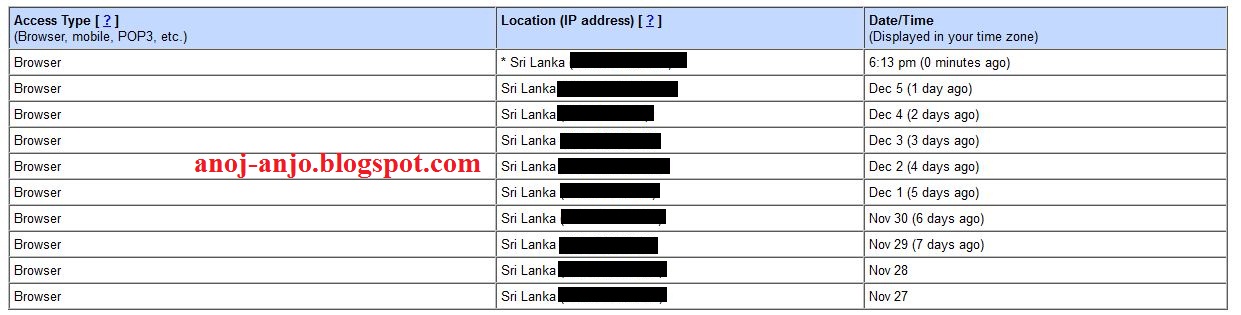
2. Now reach upto the page end, there you will see a option like Last account activity and just below that Details hyperlink as shown in below snapshot:


3. Now click on details and a new window will be pop up showing access type, Location and IP address and timestamps (date and time). The sample snapshot shows how it look like.


Now the above snapshot shows you how you have accessed your Gmail account and from which country and bracket its status code and then IP address. And last column shows Date and time at which login to account has been made.

4. If you feel or find any unusual activity change you password immediately.
5. That's all my friends.

By: Anoj_Anjo

Follow me on twitter/myspace/wayn/facebook: anoj_anjo

Monday, November 14, 2011

Increase Windows 7 Experience Index to Get Highest Score 7.9 Rating

Did you know, Vista and Windows 7 has this useful tool for advanced users called Windows Experience Index to test, benchmark their system and measure the efficiency of your computer’s hardware and software performance based on their configuration and how they work together with each other.

You can access the "Windows Experience Index" tool by clicking the Start orb/button and searching for "windows experience index" and then clicking on Check the Windows Experience Index. or by Pressing Widows Key + Pause or going to System Properties by right clicking My Computer.

Here is an example of my PC’s score (original.


How to Fake Your Windows Experience Index Score to Get Highest Rating

Now, lets see how to change it manually and get the highest windows experience index score by doing a simple edit in a system file containing your PC’s rating.

Go to C:\ Windows \Performance \WinSAT \DataStore and look for a file named (date) Formal.Assessment (Initial).WinSAT.xml


Open this file with WordPad and edit your score manually to 7.9 (that’s the max. value). Look for a code like 4.9 and change the current rating to 7.9 and save the file.

Now go to your Windows Experience Index screen again and you will see that your score is now the highest rating ie. 7.9 . You can set it at a lower rate to make it look natural while fooling your friends. See my result after the edit.


You can click Re-run the assessment to re-analyze your system performance and give you the actual score on that page.

Generally, a higher score/rating means that your computer will perform faster, better than a computer with less base score while performing advanced resource-intensive tasks and running heavy software which require more processing power and system memory.


By: Anoj_Anjo

Follow me on twitter/myspace/wayn/facebook: anoj_anjo

Disable Windows 7 Splash Screen: Make Booting Faster by Few Seconds

Windows 7 Splash Screen is the small clip that plays while booting your PC, laptop which show the windows logo saying "Starting Windows" which is around for a few seconds. Now if booting quickly is important to you then you can choose to remove and disable that splash screen which save you around 6-8 seconds of your boot time.

Follow steps below to disable Windows 7 splash screen.

Step 1: Access System Configuration Tool. Press (windows key)+ R and type in msconfig and press Enter or search for "System Configuration" in windows 7 program search from the start menu.


Step 2: In the System Configuration window click on the Boot tab. Now check the "No GUI Boot" option enabled.


Step 3: Click Apply and OK and Restart to see the settings in action.

The next time your pc boots it goes directly to the windows logon screen without wasting few seconds on the windows splash screen.

I hope you’ll find this tip useful. Also check some useful, productive Windows 7 tricks you should use.


By: Anoj_Anjo

Follow me on twitter/myspace/wayn/facebook: anoj_anjo

Friday, November 4, 2011

Translate PDF, Text, Word Documents Online Using Google Translation

If you come across any document or pdf file etc. containing text in a foreign language, here’s how you can translate it your desired language.

1. Go to Google Translate (http://translate.google.com/)

2. Click on the translate a document link on the page and browse to the pdf file, document etc. you want to upload and translate.

3. Choose Detect Language on the left and on the right select the language you want to convert the document to.

4. Click Translate button to proceed.

5. It opens a new page with the translated text… You can save this page by using Ctrl+S or selecting text and copy-pasting it to a word file.


You can also try DocTranslator, a free online translation app. for translating files and supports almost any type of office, text document formats. Although I think Google Translate does an awesome job.

There is also a Google translate desktop client you can download and install to translate webpages, email and other documents without opening online-translation sites.

By: Anoj_Anjo

Follow me on twitter/myspace/wayn/facebook: anoj_anjo

How To Create Fake Facebook Conversations

Wanna to make make own funny and cool facebook conversation and have fun ? In this post I’ll show you how to use web service for creating fake facebook conversation.

1) Go to fakeconvos.com

2) Click on create a new convo


3)Type name of commenter, select your upload picture, type what ever you want to say and click on add stream
you can add as many people to the stream as you want, you can even login to the facebook and add your actual friends to the stream


4)Type descriptive title and save it. That's it.


By: Anoj_Anjo

Follow me on twitter/myspace/wayn/facebook: anoj_anjo

Monday, October 31, 2011

Apply Cool Vintage, Color Effects to Photos Online Free with PicFull

While there is a flood of image editing sites out there, we should focus on sites providing unique, high quality photo filters that are truly easy to use.

Picfull is a free and online service to edit your photos with ease, completely online. While many different online services exist to spice up your images, most of them are just for instant fun.

Their selection ranges from vintage filters to bolder modern ones, each of which has its own set of parameters that can be tweaked by the user in real time. Plus, multiple filters can be applied to the same photo, allowing for almost endless variations.

Edit Photos Online with PicFull : Add Vintage, Colour Effects


Picfull tries to be different by providing a quality selection of high quality filers, which are truly easy to use. The quality of your photo is not compromised, as it doesn’t scale down the image but keeps the original resolution intact.


The process of editing your own photos is very simple. First, you choose a photo from your computer to work with. Next, choose one of the many filters to apply to your photo. Now, you can customize your photos to your liking, by changing one or more filter parameters.

Once you are happy with the result you can apply the filter, and then can choose another filter to process the photo with again. This allows for endless variations, as you can stack filters on top of each other. Finally, when you’re done, your photo can be downloaded and shared with the world.

Here are some samples of some the colour effects available. Visit the site for more…


Here is a summary of Picfull’s most important features:

High quality resolution output; no downscaling.
Large variety of high quality filters, each providing unique parameters for customization.
By tracking filters on top of each other, endless variations are possible.

► Visit http://www.picfull.com to add cool colour effects to your photos.


By: Anoj_Anjo

Follow me on twitter/myspace/wayn/facebook: anoj_anjo

Friday, September 16, 2011

Free MD5 Decrypter, SHA1 Decrypter Hash Cracking Sites

In this article I am posting list of site for decrypting MD5, SHA1 hashes.


How to Decrypt MD5 Hash

* http://www.md5-db.com/index.php
* http://plain-text.info/add/
* http://www.tmto.org/
* https://hashcracking.ru/
* http://hashcrack.com/
* http://www.cryptohaze.com/addhashes.php
* http://md5decryption.com/
* http://authsecu.com/decrypter-dechif...r-hash-md5.php
* http://hash.insidepro.com/
* http://md5decrypter.com/
* http://md5pass.info/
* http://crackfor.me/
* http://www.xmd5.org/
* http://socialware.ru/md5_crack.php
* http://md5.my-addr.com/md5_decrypt-m...coder_tool.php
* http://passcracking.com
* http://www.md5this.com
* http://www.md5this.com/submit-your-hash/index.php
* http://md5.benramsey.com
* http://nz.md5.crysm.net
* http://us.md5.crysm.net
* http://www.xmd5.org
* http://gdataonline.com
* http://www.hashchecker.com
* http://passcracking.ru
* http://www.milw0rm.com/md5
* http://plain-text.info
* http://www.securitystats.com/tools/hashcrack.php
* http://www.schwett.com/md5/
* http://passcrack.spb.ru/
* http://shm.pl/md5/
* http://www.tydal.nu/article/md5-cr*ck/
* http://ivdb.org/search/md5/
* http://md5.netsons.org/
* http://md5.c.la/
* http://www.jock-security.com/md5_database/?page=cr*ck
* http://c4p-sl0ck.dyndns.org/cracker.php
* http://www.blackfiresecurity.com/tools/md5lib.php


How to Decrypt SHA1 Hash

* http://passcrack.spb.ru/
* http://www.hashreverse.com/
* http://rainbowcrack.com/
* http://www.md5encryption.com/
* http://www.shalookup.com/
* http://md5.rednoize.com/
* http://c4p-sl0ck.dyndns.org/cracker.php
* http://www.tmto.org/
* http://linardy.com/md5.php
* http://www.gdataonline.com/seekhash.php
* https://www.w4ck1ng.com/cracker/
* http://search.cpan.org/~blwood/digest-md5-reverse-1.3/
* http://shm.pl/md5/
* http://www.neeao.com/md5/
* http://md5.benramsey.com/
* http://www.md5decrypt.com/
* http://md5.khrone.pl/
* http://www.csthis.com/md5/index.php
* http://www.md5decrypter.com/
* http://www.md5encryption.com/
* http://www.md5database.net/
* http://md5.xpzone.de/
* http://www.hashreverse.com/
* http://alimamed.pp.ru/md5/
* http://md5crack.it-helpnet.de/index.php?op=add
* http://shm.hard-core.pl/md5/
* http://rainbowcrack.com/
* http://md5.c.la/
* http://www.md5-db.com/index.php
* http://md5.idiobase.de/
* http://md5search.deerme.org/
* http://sha1search.com/


So friends, I hope above sites will help you to decrypt MD5 and SHA1 hash and SHA1 / MD5 password using above sites.

Enjoy MD5 and MD4 decrypter sites to decrypt MD5 and MD4 password hashes...


By: Anoj_Anjo

Follow me on twitter/myspace/wayn/facebook: anoj_anjo

Tuesday, September 13, 2011

Top 5 Free Cloud Storage Services with Best Referral Space Bonus

These days you can’t even give megabytes of memory away. In the age of the terabyte, the gigabyte is losing it’s value, but in terms of mere data storage, the GB still goes a long way. For that reason, cloud computing services that provide free storage space in the low GBs remain a terrific option for those looking to backup basic information remotely.

Best Free Cloud Based File Upload, Backup Services

The following are five cloud storage services that give you the most potential memory for free. They don’t replace the function of a paid-for unlimited or near-unlimited storage center, but for word documents and other small files it’s a service you shouldn’t go without.

1. SugarSync


Top 5 Free Cloud Storage Services with Best Referral Space BonusWhen you sign up with SugarSync, you’re instantly entitled to 5 GB worth of storage. Up to 5 GB more can be yours if you get enough friends to sign-up at 500 MB per person. Of all the possible free memory sources this one offers the most for the least amount of effort on the part of the user.

2. Dropbox


Top 5 Free Cloud Storage Services with Best Referral Space Bonus8 GB can potentially be yours as well through Dropbox, but it’s harder to earn. One of your friend invites successfully brought to membership status will net you 250 MB, with a maximum of 6 GB on top of the 2 GB automatically given to you. The one benefit of Dropbox over SugarSync is that it supports Linux in addition to Windows and Mac operating systems.

3. TeamDrive

TeamDrive is identical to Dropbox. It includes the initial storage space provided (2 GB), the rate in which signing up friends earns you more (250 MB per) and the total storage you can get for free (8 GB). However, TeamDrive does not support mobile operating systems like Dropbox.

4. Synplicity

Signing up with Syncplicity immediately earns you 2 GB of free cloud storage. Inviting friends can earn you 3 GB more. The benefit of Syncplicity is that the act of signing a friend up is worth much more; one friend equals one earned gigabyte (1GB).

5. OpenDrive

By joining OpenDrive you receive 5 GB of free cloud storage space to do with as you wish. There’s no incentive to invite friends, so 5 GB is all you get. It’s simple, which is nice. However, OpenDrive only supports Windows operating system, so if you have more than one OS, it’s smart to skip it in favour of another option.


By: Anoj_Anjo

Follow me on twitter/myspace/wayn/facebook: anoj_anjo

Saturday, August 20, 2011

Recall Websites Visited Earlier, Browsing History in Firefox Easily

We make a lot of searches everyday through Google and other sites and visit many sites. We sometimes search for things that we searched earlier. Browser history saves us in these cases. Just type any keyword in the address bar and the browser happily shows you the sites you have visited earlier.

However, there are some situations browser histories will not help you. For example, you would have previously searched for the term "fried blueberry pancake" and if you accidentally remember it as "fried raspberry pancake", browser history won’t return any result. This is because, browser history searches the complete keywords and not the part of it.

This is where the Recall Monkey add-on for Firefox comes in. Recall Monkey Firefox add on makes Firefox history search more useful by searching in a new way. If you have watched search engines, they search not only complete keywords but also the part of the keywords. Recall monkey Firefox add on works exactly in the same way.

Select "Recall Monkey" from the "File" menu in the old menu bar or press Ctrl + Alt + M in your keyboard to activate this add on and start searching for Firefox History. Unfortunately this add on doesn’t support Firefox menu button. There are options to filter search results based on the "Time Range".

► Install Recall Monkey : https://addons.mozilla.org/en-US/firefox/addon/prospector-recall-monkey/

This is a no-restart add-on, just install and you’re ready to go.


By: Anoj_Anjo

Follow me on twitter/myspace/wayn/facebook: anoj_anjo